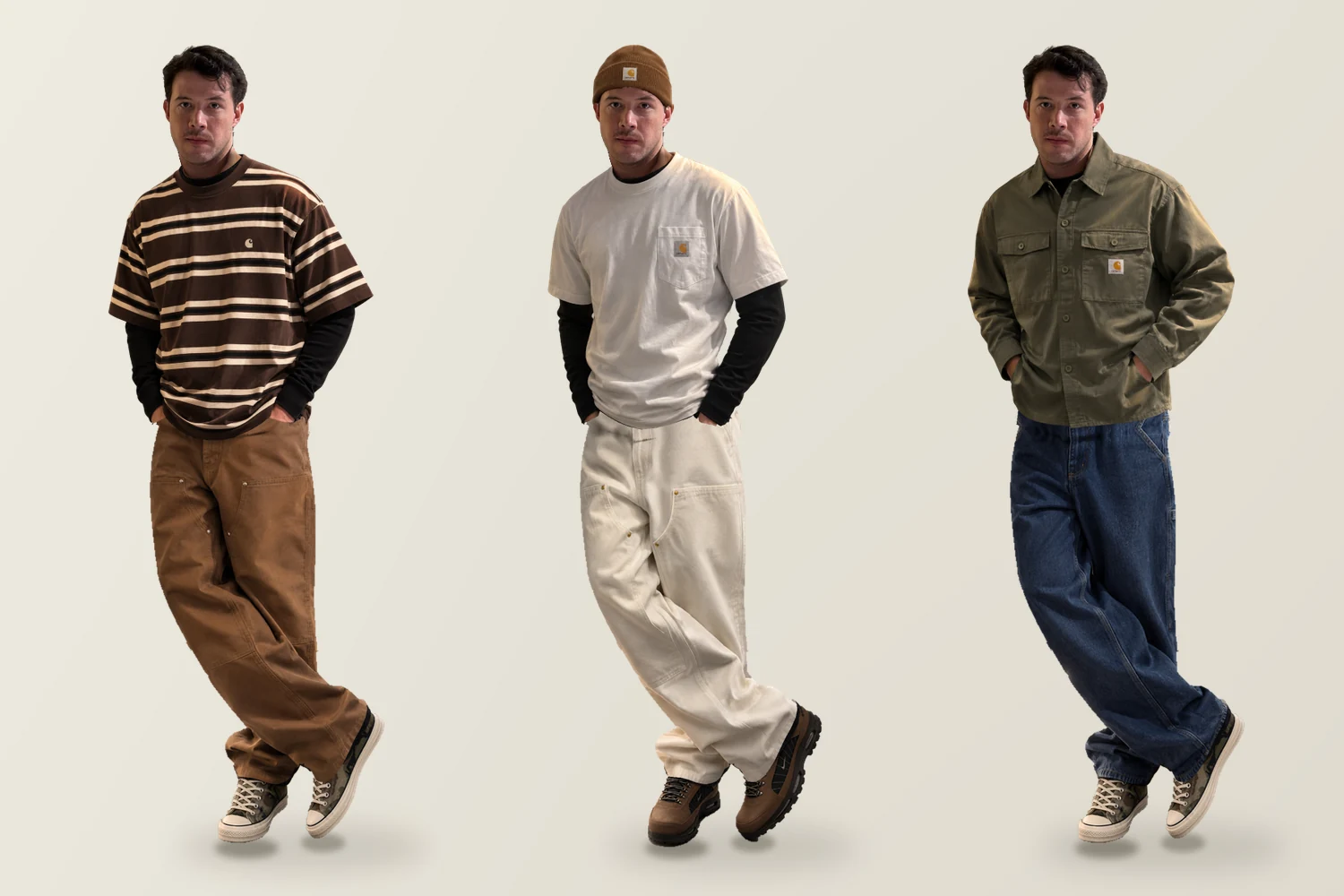
Comece com uma foto sua
Escolha uma foto em que você já esteja vestido, com o rosto nítido e os dois calçados inteiros. Deixe espaço acima da cabeça e abaixo dos pés para o corte vertical. Se for fotografar agora, apoie o celular e faça também uma foto do cenário vazio, do mesmo lugar. Ela pode abrir o vídeo.
No meu Reel, as mãos estão nos bolsos e as pernas estão cruzadas. Essa pose define onde caem os punhos, qual perna aparece na frente e quanto de cada tênis fica por baixo da barra.
De onde vêm as suas peças?
Os dois caminhos usam a mesma foto de corpo inteiro. O que muda é a referência que você envia para cada peça.
Fotografe suas roupas
Faça uma foto principal de cada roupa sobre um fundo liso, com luz suave. Mostre mangas, gola e barra inteiras. Para o calçado, fotografe os dois pés do par no mesmo ângulo dos seus. Se uma costura ou estampa for importante, mande também um close com o nome da peça.
Usar minhas roupasEscolha peças de catálogo
Envie uma imagem de catálogo ou captura de tela por peça. Se mandar um link, informe o modelo e a cor. Se o ChatGPT não conseguir abrir a página, ou se aparecer outra variante, anexe uma imagem daquele item. Prefira fotos que mostrem a silhueta inteira.
Usar peças de catálogoAjuste uma peça de cada vez
No ChatGPT, comece por uma peça que seja fácil conferir, como a jaqueta. Peça uma prévia sobre a sua foto e um PNG transparente no mesmo tamanho da tela. Assim a camada entra e sai no lugar certo. A jaqueta marrom da abertura veio da minha foto. Adaptei as outras peças à postura dela.
Confira a gola, os punhos e a cintura. Na touca, veja onde a borda encontra a testa e quais fios ficariam debaixo do tecido. Nos óculos, alinhe a ponte ao nariz e acompanhe as hastes até as orelhas. Use os pixels do rosto original nas áreas que continuam visíveis.
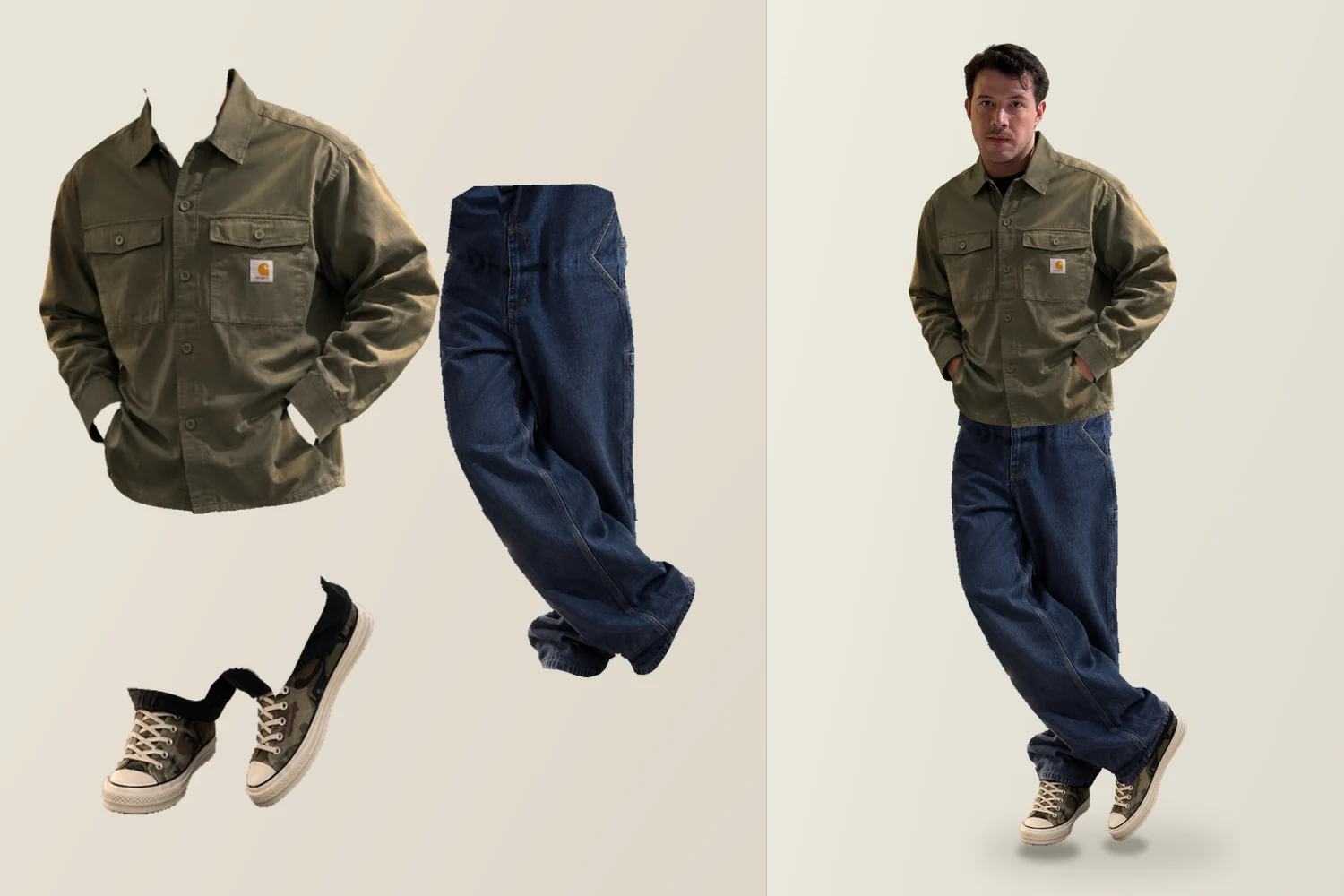
Dê ritmo às trocas
Reúna a foto, o cenário vazio e os PNGs aprovados em uma pasta. Abra a pasta no Codex e peça uma prévia vertical a 30 quadros por segundo. No meu vídeo, a sala aparece vazia, eu entro vestido e a roleta começa quando o fundo já está em preto e branco.
Na roleta, alterno entrada e retirada a cada dois quadros. São 16 entradas e 15 retiradas, com um clique por evento. A última peça fica na foto. Depois eu seguro os looks por mais tempo. Veja a prévia no celular e confira se a cabeça fica parada e se a sola continua no chão.
O título e a chamada
Começo com a sala vazia e entro de corpo inteiro aos 0,23 s. Sobre a foto, título, marca e chamada entram a intervalos de 0,80 s, cada um com seu clique. Aos 0,70 s aparece Choose My Outfit, com Choose My em Archivo e Outfit em Instrument Serif itálica. Aos 1,50 s aparece o logo oficial da Carhartt WIP. Aos 2,30 s entra a chamada em duas linhas, Comment “PROMPT” na primeira e for the full tutorial na segunda. Ela fica na tela por 1,60 s. Centralizei o desenho visível de cada gráfico branco no quadro inteiro. Deixei três quadros só com a foto entre os gráficos, e as três saídas são silenciosas.
O cenário passa para preto e branco em três cortes. A roleta começa aos 4,80 s e para na peça escolhida aos 6,80 s. No corte seguinte, aos 7,03 s, já entra a primeira troca do look. No fim, Comment “PROMPT” for the prompt entra aos 19,37 s e o logo do Codex entra aos 21,43 s. O do ChatGPT aparece aos 21,73 s. Os dois dividem o quadro por um momento e também saem em cortes separados. O vídeo dura 24,57 s, com 94 mudanças visuais e 91 cliques.
Copie o seu prompt
Escolha o tipo de referência. O prompt está em inglês e já vem preparado para o seu caminho. Preencha os campos entre colchetes, use a primeira parte no ChatGPT e leve a segunda ao Codex junto com os PNGs aprovados.
Prompt para minhas roupas
Ler o prompt completo
Make a vertical stop-motion outfit reel from my full-body photograph.

Full-body photo: [filename].
Empty background photo: [filename, or “not available”].
Items: [one row per item: item ID | filename or link | color and essential details].
Final outfit: [item IDs]. Edit order: [item IDs or “propose an order”].
Series title: [Choose My Outfit]. Comment keyword: [PROMPT].

ROUTE A — MY OWN CLOTHES

My input is a separate photo of each garment or pair of shoes, plus optional detail shots using the same item ID. Match the real fabric, wear, closures, graphics and color. Use the angle of my feet for footwear. Ask for a clearer image if a distinctive feature is hidden.

PART 1 — CHATGPT: PREPARE THE GARMENTS

Use my fully dressed photograph as the base. Preserve my face and hair from the actual photo wherever visible. Lock the pose, body scale, camera and lighting. Crop to 1080 × 1920 with my head and both shoes visible. Keep the same canvas for every layer.

Start with [one item ID]. Match the shoulder angle, elbow bend, cuff and pocket positions. Respect the original overlap of the legs and keep the soles grounded. Pant hems should cover the tops of the shoes naturally. Rest glasses on my nasal bridge and tuck the temples behind my ears. Fit a beanie to my skull and cover only hair that would be under the knit. Restore my photographed outfit whenever a clothing slot is empty.

Show the first piece over my photo and provide its separate transparent PNG in the full registered canvas. Ask me to check the fit. Repeat for the remaining pieces, one at a time. Give each file its item ID. If an edge needs revision, change only that piece.

PART 2 — CODEX: EDIT THE APPROVED FILES

Read the photo, background and approved PNGs in [project folder]. Open on the empty scene, then show me in my original clothes. If I have no empty scene, prepare one by removing only the person. Leave writing, architecture and camera position consistent.

Lock the camera on the room and preserve the original light, color, sharpness and full-body framing. Work at 30 fps. Start on the empty room at frame 0. Bring me in wearing the clothes from my photo at frame 7.

Cut between three pure-white graphics over the photograph. Center the visible lettering or logo itself on both axes of the full 1080 × 1920 frame, at (540, 960). Use the bounds of the visible strokes when positioning each graphic, including the official wordmark. Keep the other layers in place.

1. On frame 21 (0.70 seconds), show the complete title “Choose My Outfit” on one line. Set “Choose My” in Archivo sans serif and “Outfit” in italic Instrument Serif. Clear the title silently on frame 42. Leave frames 42–44 clear.
2. On frame 45 (1.50 seconds), show the supplied official Carhartt WIP wordmark in white at its original proportions. Clear it silently on frame 66. Leave frames 66–68 clear.
3. On frame 69 (2.30 seconds), show this exact invitation on two centered lines, centered together as a single block:
Comment “PROMPT”
for the full tutorial

Hold the invitation for 1.60 seconds, through frame 116. Clear it silently on frame 117. The three graphic entrances are 0.80 seconds apart, each with one click. The full edit has 94 visual changes and 91 audible clicks. Keep changes to clothes and accessories on separate cuts, with one click per change.

At frame 581 (19.37 seconds), hold this exact closing invitation:
Comment “PROMPT” for the prompt

Give each closing credit its own beat. Bring in the official Codex mark at frame 643 (21.43 seconds) and the ChatGPT mark at frame 652 (21.73 seconds). Keep them together briefly, then remove them on separate cuts on frames 681 and 690.

If I supplied a different series title, use it. If I supplied a different comment keyword, substitute it in both invitations.

Turn the background black and white in three steps on frames 123, 130 and 137. At frame 144 (4.80 seconds), shuffle through the 16 items. Alternate 16 entrances and 15 exits at two-frame intervals, with one click for each event. Land on [item ID] at frame 204 (6.80 seconds) and cut directly to the first regular change at frame 211 (7.03 seconds). Then build the outfits in discrete cuts with longer holds. Keep my head, the room and my points of contact stationary.

Keep the edit to 737 frames at 30 fps (24.57 seconds). Render a phone preview first and review the fit in close-up. Export a vertical 1080 × 1920 H.264 MP4 with audio and retain the individual layers and editable timeline.
Prompt para peças de catálogo
Ler o prompt completo
Make a vertical stop-motion outfit reel from my full-body photograph.

Full-body photo: [filename].
Empty background photo: [filename, or “not available”].
Items: [one row per item: item ID | filename or link | color and essential details].
Final outfit: [item IDs]. Edit order: [item IDs or “propose an order”].
Series title: [Choose My Outfit]. Comment keyword: [PROMPT].

ROUTE B — THE PRODUCTS I CHOSE

Use one catalog photo or screenshot per item and its exact model and color. If I give a product link, use it only when you can open it and see the chosen variant. If it is private, unavailable or shows a different color, ask me to upload an image of that specific item. Adapt only its drape and perspective to my pose.

PART 1 — CHATGPT: PREPARE THE GARMENTS

Use my fully dressed photograph as the base. Preserve my face and hair from the actual photo wherever visible. Lock the pose, body scale, camera and lighting. Crop to 1080 × 1920 with my head and both shoes visible. Keep the same canvas for every layer.

Start with [one item ID]. Match the shoulder angle, elbow bend, cuff and pocket positions. Respect the original overlap of the legs and keep the soles grounded. Pant hems should cover the tops of the shoes naturally. Rest glasses on my nasal bridge and tuck the temples behind my ears. Fit a beanie to my skull and cover only hair that would be under the knit. Restore my photographed outfit whenever a clothing slot is empty.

Show the first piece over my photo and provide its separate transparent PNG in the full registered canvas. Ask me to check the fit. Repeat for the remaining pieces, one at a time. Give each file its item ID. If an edge needs revision, change only that piece.

PART 2 — CODEX: EDIT THE APPROVED FILES

Read the photo, background and approved PNGs in [project folder]. Open on the empty scene, then show me in my original clothes. If I have no empty scene, prepare one by removing only the person. Leave writing, architecture and camera position consistent.

Lock the camera on the room and preserve the original light, color, sharpness and full-body framing. Work at 30 fps. Start on the empty room at frame 0. Bring me in wearing the clothes from my photo at frame 7.

Cut between three pure-white graphics over the photograph. Center the visible lettering or logo itself on both axes of the full 1080 × 1920 frame, at (540, 960). Use the bounds of the visible strokes when positioning each graphic, including the official wordmark. Keep the other layers in place.

1. On frame 21 (0.70 seconds), show the complete title “Choose My Outfit” on one line. Set “Choose My” in Archivo sans serif and “Outfit” in italic Instrument Serif. Clear the title silently on frame 42. Leave frames 42–44 clear.
2. On frame 45 (1.50 seconds), show the supplied official Carhartt WIP wordmark in white at its original proportions. Clear it silently on frame 66. Leave frames 66–68 clear.
3. On frame 69 (2.30 seconds), show this exact invitation on two centered lines, centered together as a single block:
Comment “PROMPT”
for the full tutorial

Hold the invitation for 1.60 seconds, through frame 116. Clear it silently on frame 117. The three graphic entrances are 0.80 seconds apart, each with one click. The full edit has 94 visual changes and 91 audible clicks. Keep changes to clothes and accessories on separate cuts, with one click per change.

At frame 581 (19.37 seconds), hold this exact closing invitation:
Comment “PROMPT” for the prompt

Give each closing credit its own beat. Bring in the official Codex mark at frame 643 (21.43 seconds) and the ChatGPT mark at frame 652 (21.73 seconds). Keep them together briefly, then remove them on separate cuts on frames 681 and 690.

If I supplied a different series title, use it. If I supplied a different comment keyword, substitute it in both invitations.

Turn the background black and white in three steps on frames 123, 130 and 137. At frame 144 (4.80 seconds), shuffle through the 16 items. Alternate 16 entrances and 15 exits at two-frame intervals, with one click for each event. Land on [item ID] at frame 204 (6.80 seconds) and cut directly to the first regular change at frame 211 (7.03 seconds). Then build the outfits in discrete cuts with longer holds. Keep my head, the room and my points of contact stationary.

Keep the edit to 737 frames at 30 fps (24.57 seconds). Render a phone preview first and review the fit in close-up. Export a vertical 1080 × 1920 H.264 MP4 with audio and retain the individual layers and editable timeline.
Se só os óculos estiverem tortos
Peça uma revisão só dessa camada. Você pode usar esta frase em inglês.
Adjust only the sunglasses layer. Center the bridge on my nose, match the tilt of my eyes, and tuck the temples behind my ears. Show a close-up over my original photo. Keep the face, framing and all other layers fixed.